
| EEDMOE Job Circular 2024 | |
|---|---|
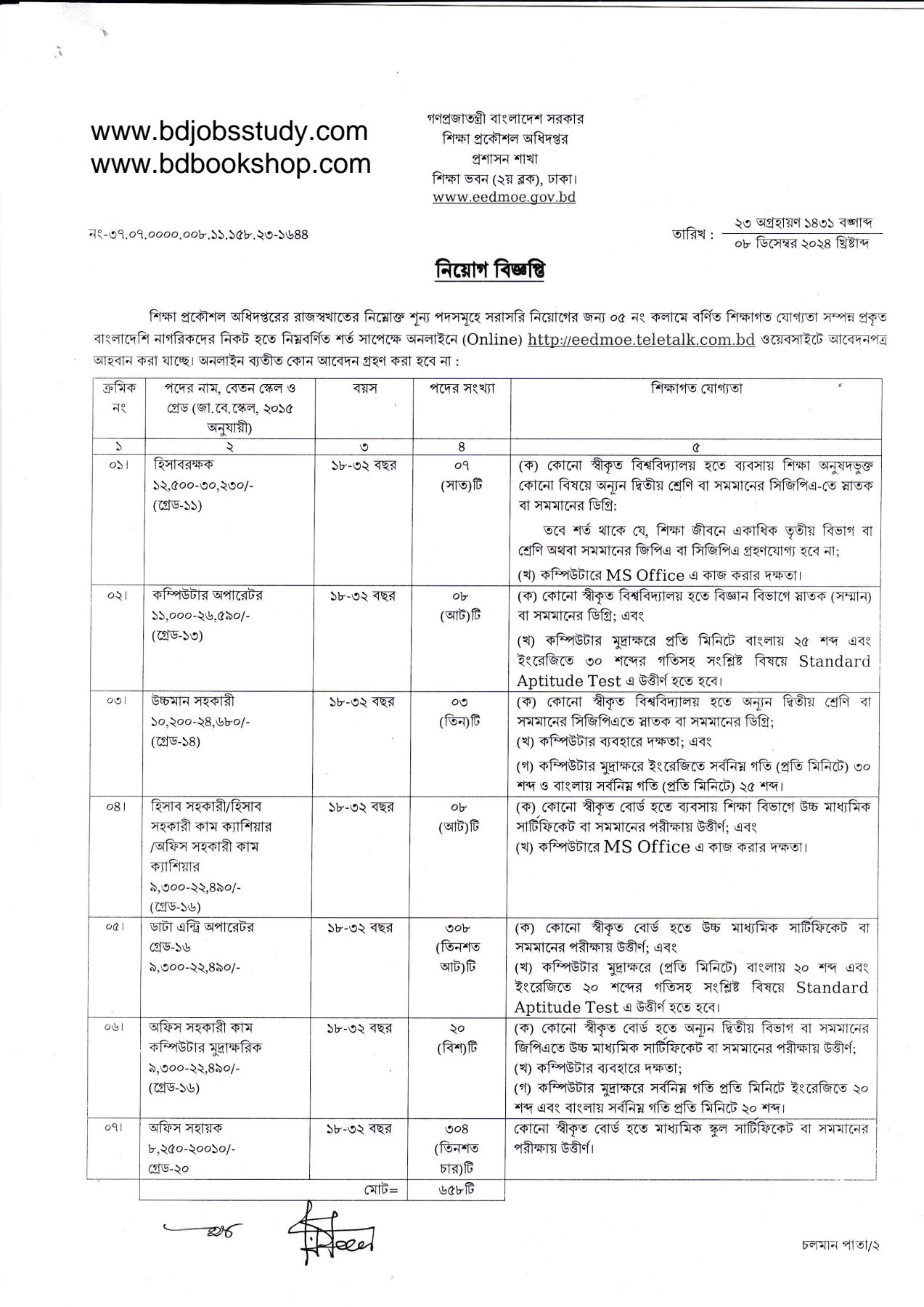
| Employer Name: | Education Engineering Department (EEDMOE). |
| Post Name: | Post names are given above. |
| Job Location: | Depends on the posting. |
| Posts Category: | 07. |
| Total Vacancies: | 567 posts. |
| Job Type: | Full time. |
| Job Category: | Govt Jobs. |
| Gender: | Both males and females are allowed to apply. |
| Age Limitation: | On 01 December 2024, the age of candidates should be 18 to 32 years. |
| Educational Qualification: | SSC Pass, HSC Pass, graduate and post-graduate pass. |
| Experience Requirements: | Freshers and experienced candidates can apply. |
| Districts: | Candidates from all districts can apply. |
| Salary: | 8,250-30,230 Taka. |
| Other Benefits: | As per government employment laws and Regulations. |
| Application Fee: | 112, 223 & 335. |
| Source: | The Daily Ittefaq, 09 December 2024. |
| Job Publish Date: | 09 December 2024. |
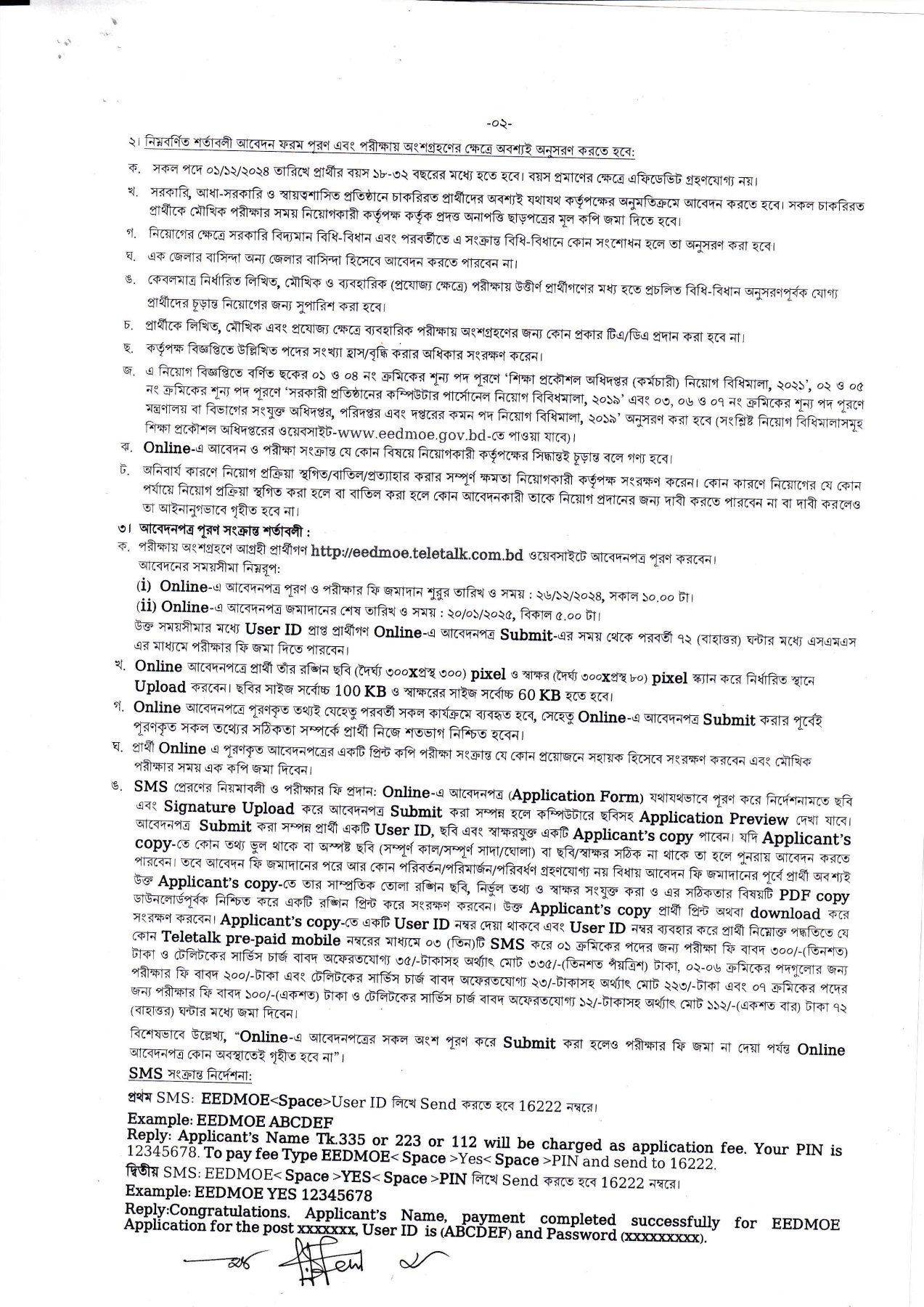
| Application Start Date: | 26 December 2024 at 10:00 AM. |
| Application Deadline: | 20 January 2025 at 5:00 PM. |
EED Job Circular 2024
| Employer Information | |
|---|---|
| Employer: | Education Engineering Department |
| Organization Type: | Government Organization |
| Phone Number: | -121 |
| Fax Number: | -121 |
| Email Address: | – |
| Head Office Address: | Dhaka |
| Official Website: | www.eedmoe.gov.bd |
Read More
- Govt Job Circular
- All Power Sector Job
- Weakly Job Circular
- All BD Jobs Study Note
- Monthly Current Affairs
Read More
- Diploma Jobs Circular 2025
- Bsc Jobs Circular 2025
- General Jobs Circular 2025
- Technical Jobs Circular 2025
- All Bank Jobs Circular 2025
Read More
Step-by-Step Guide for Online Application via Teletalk.com.bd
- Visit the Official Website:
Go to the designated application portal, typically in the formatwww.[organization].teletalk.com.bd.
Example: For specific job circulars, the URL may look likewww.eedmoe.teletalk.com.bd. - Locate the Application Form:
- Click on the “Apply Now” button or link.
- Select the desired position (if multiple positions are available
- Fill Out the Application Form:
- Enter all required information such as:
- Personal Details (Name, Date of Birth, National ID)
- Educational Qualifications
- Work Experience (if applicable)
- Contact Details (Phone Number, Email)
- Double-check all the details before proceeding.
- Enter all required information such as:
- Upload Required Documents:
- Upload scanned copies of:
- Recent Passport-sized Photograph (Size: Typically 300×300 px, < 100KB)
- Signature (Size: Typically 300×80 px, < 60KB)
- Upload scanned copies of:
- Submit the Application:
- After completing the form, click “Submit”.
- You will receive a User ID on the confirmation page. Save this User ID for future reference.
- Pay the Application Fee:
- Using your User ID, send an SMS through any Teletalk Prepaid SIM to pay the application fee.
- Follow this format:
- First SMS:
EEDMOE <User ID>EF
Example: EEDMOE ABCD
Send to 16222. - You will receive a PIN via SMS.
- Second SMS:
EEDMOE <User ID> <PIN>
Example: EEDMOE ABCDEF 567890
Send to 16222.
- First SMS:
- Once the payment is successful, you will receive a confirmation message.
- Download the Admit Card (if applicable):
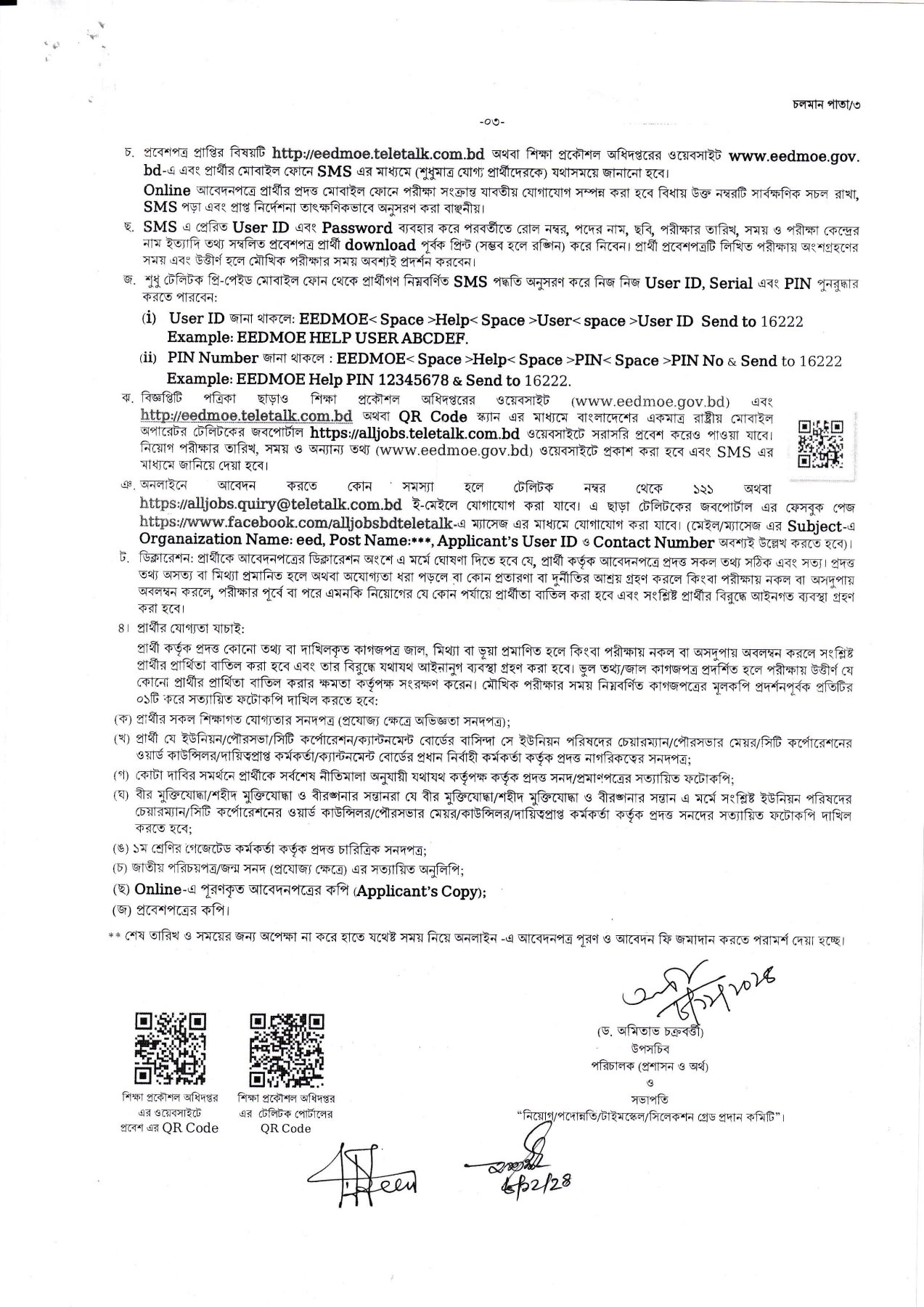
- Once the application is complete and the payment is confirmed, you can download the Admit Card for the recruitment test when it becomes available.
- Use your User ID and password to log in and access it.
Tips for a Successful Application:
- Check Deadlines: Ensure you complete the application before the deadline. Late submissions are not accepted.
- Accuracy: Fill in all information accurately to avoid disqualification.
- Keep Records: Save your User ID, PIN, and payment confirmation messages for future use.
- Follow Guidelines: Adhere to the specific instructions provided in the job circular.